
DNS Records
DNS records connect your domain to services. Each record has a name, a type, a value, and a TTL. This page covers the shared rules. Each type has its own page with fields, examples, and constraints.
Record Types
Section titled “Record Types”| Type | Purpose | Page |
|---|---|---|
A / AAAA | Point a name at an IPv4 or IPv6 address | A and AAAA |
CNAME | Alias one name to another | CNAME |
MX | Route email to a mail server | MX |
TXT | Store text (SPF, DKIM, verification) | TXT |
CAA | Restrict certificate issuance to chosen CAs | CAA |
NS | Delegate a subdomain to other name servers | NS |
Names Are Relative
Section titled “Names Are Relative”The record name is relative to your zone. Enter www for www.example.com, not the full name.
Use @ for the zone root (the apex). In the CLI and API, ZCP appends the zone for you, so a full
name like www.example.com becomes www.example.com.example.com.
Values With a Trailing Dot
Section titled “Values With a Trailing Dot”Hostname values, such as a CNAME target, an MX mail server, or an NS name server, should end
with a trailing dot. For example, use mail.example.com.. The dot marks the name as fully qualified
so ZCP does not treat it as relative to your zone.
The TTL (time to live) is how long, in seconds, resolvers cache the record. The default is
14400 (4 hours). Lower it to 300 a day or two before you plan to change a record, so the change
propagates quickly. Raise it again once the record is stable.
Several Values per Name and Type
Section titled “Several Values per Name and Type”A name and type hold several values. Creating a record at a name and type with existing values adds
the new value to the set. The existing values stay. For example, add a second A record, a second
MX record, or a third TXT record at the same name. You do not need a support ticket for this.
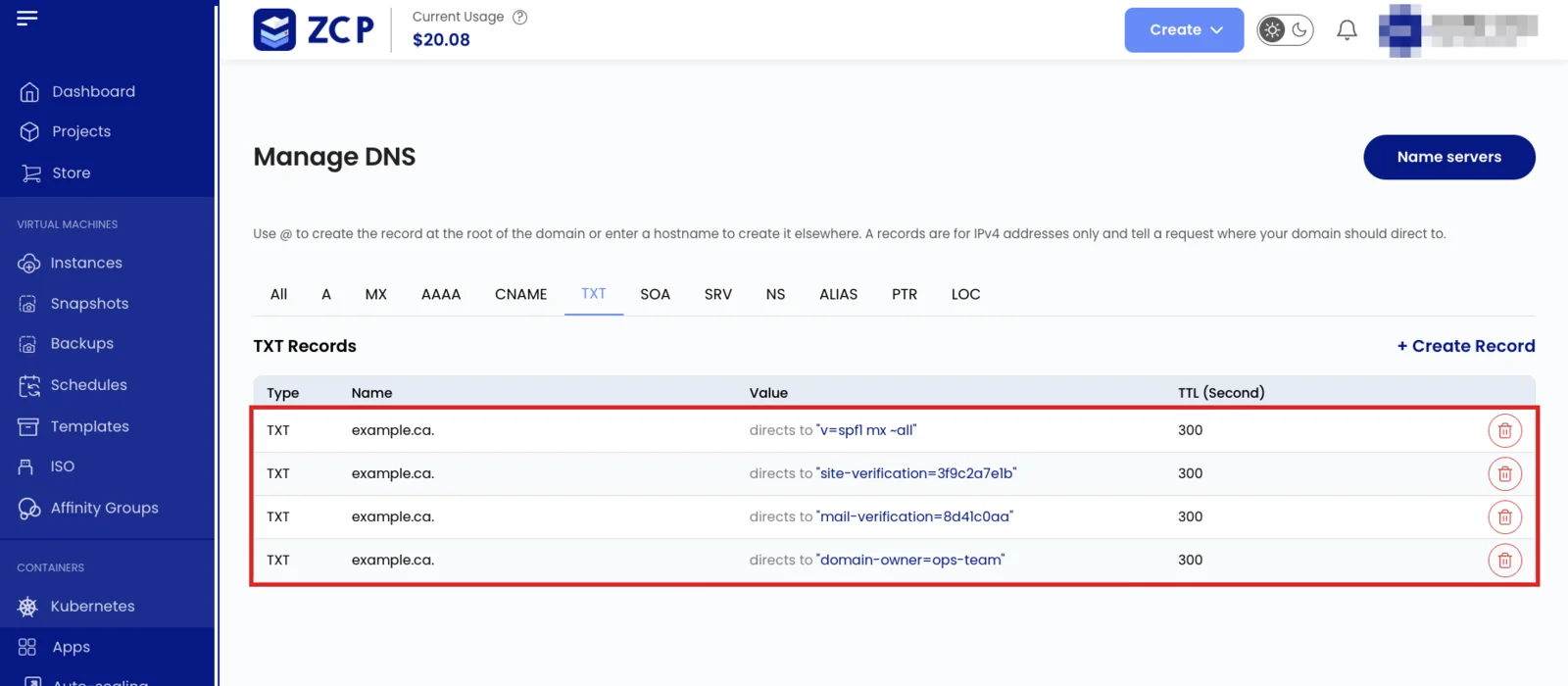
Creating an exact copy of an existing value does not create a second copy, and it does not remove the other values.
Deleting a value in the console removes only that value. The other values stay.
Enter a TXT value with or without double quotes. The platform stores it quoted and returns it
quoted.
Known Limitations
Section titled “Known Limitations”The first two limits apply to the console, the CLI, and the API alike. The last applies to the CLI.
CNAME Cannot Share a Name
Section titled “CNAME Cannot Share a Name”A name holding a CNAME holds nothing else, so it cannot also carry an A, MX, or TXT record.
Creating a CNAME at a name with other records fails with an error like
RRset www IN CNAME: Conflicts with pre-existing RRset. Use a CNAME only on a name with no other
records, and never at the zone apex.
No In-Place Update
Section titled “No In-Place Update”There is no update action. To change a value, delete it and create it again with the new value.
CLI Delete Uses an Initial Snapshot
Section titled “CLI Delete Uses an Initial Snapshot”zcp dns record-delete attempts to delete each value it reads initially at a name and type. Values
added concurrently remain. The CLI is not suitable for removing one selected value. Use the console
or the API with the exact record content instead.
How to Manage Records
Section titled “How to Manage Records”Every type works the same way across all surfaces:
- Console: the DNS section of the portal, then Create Record.
- CLI: Manage DNS with the CLI.
- API: Manage DNS with the API.
There is no update action. To change a record, delete it and create it again with the new value.
See also: DNS Overview, Worked examples, Troubleshooting